Voteview for Windows v3.03 Installation Instructions
26 September 2008: We are in the process of building a web-based version of VOTEVIEW. The version posted below is current as of 2003 and still runs under WINDOWS XP. When the Web-based version is up we will post a link here and circulate an announcement.
A very useful manual for using NOMINATE scores and VOTEVIEW was written by Phil Everson, Rick Valelly, and Jim Wiseman. They will update the manual for the web-based version of VOTEVIEW when it is on-line.
 "NOMINATE and American Political History: A Primer." by
Phil Everson (Swarthmore), Rick Valelly (Swarthmore), and Jim Wiseman (Agnes Smith)
"NOMINATE and American Political History: A Primer." by
Phil Everson (Swarthmore), Rick Valelly (Swarthmore), and Jim Wiseman (Agnes Smith)The most up-to-date version of Voteview is v3.03. This version is still undergoing testing and may still be buggy. We appreciate any feedback and bug reports that will help us make the software more robust and the data presented more accurate.
Voteview for Windows runs on Windows 95, 98, Windows NT 4.0, and Windows 2000.
The program requires about 18 megabytes of hard disk space, though some of that it shares with other common Windows programs. The data files for all 106 House and Senate files total nearly 65 megabytes.
1. Download "voteview_303c_setup.exe" and libtiff.dll. Depending upon your version of WINDOWS, Libtiff.dll may be missing in your operating system. Place Libtiff.dll in the directory:
C:\WINNT\System32
or any other directory in your path statement.
2. Download "Houses.zip" and "Senates.zip".
3. Click on voteview_303_setup.exe" and it will self extract the setup files.
4. Click on "setup.exe" to start the installation process.
5. Unzip the House data files to the "House" subdirectory of wherever you installed Voteview. (eg, "c:\Program Files\Voteview for Windows\House\")
6. Unzip the Senate data files to the "Senate" subdirectory of wherever you installed Voteview. (eg, "c:\Program Files\Voteview for Windows\Senate\")
7. Click on the Voteview for Windows icon through the Start menu to run Voteview.
8. We occasionally make simple bug fixes to VOTEVIEW so check the creation date of VOTEVIEW.EXE and if it is prior to 25 February 2003 you can download the latest VOTEVIEW.EXE here. Simply overwrite the version you have with this one.
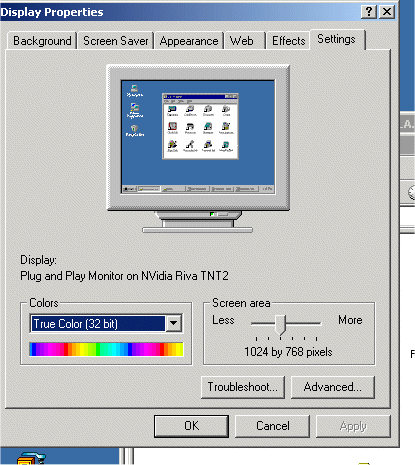
9. If you do not see the U.S. map display correctly -- that is, if the congressional districts are not painted red and blue corresponding to "Yea" and "Nay" by the corresponding representatives, you may have to change the color setting on your monitor to "True Color (32 bit)." See below:
Voteview for Windows comes with extensive on-line help. Press F1 or the "Help" button in any window for access to this help.